
This actually gave me a lot of trouble since this is the first time I had to sign anything through a pdf reader.
If anyone is having trouble with this... I think the easiest way to sign this agreement is with Adobe Acrobat Reader version 10 or higher. Even when signing is not allowed,
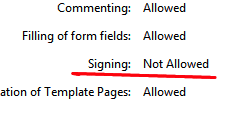
You can still "draw"!
(@ewu: PLEASE CONFIRM IF THIS METHOD IS ACCEPTABLE. Because it wasn't mentioned in the "How To" video Fanime linked http://tv.adobe.com/watch/acrobat-x/how-to-digitally-sign-a-document-with-adobe-reader/)
Open the pdf in Adobe Acrobat Reader and on the right side, click on COMMENT > DRAWING MARKUPS > select the pencil (DRAW FREE FORM) and draw/sign your name.
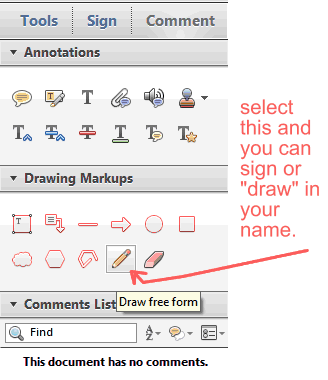
I don't know how to change the ink color though. But here's a "SAMPLE" when using a touch pad on Windows 7.
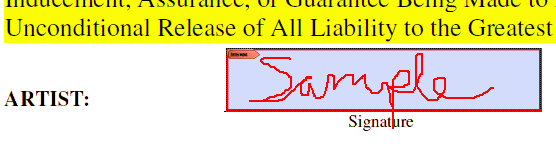
Then just fill everything out, sign, SAVE the pdf and UPLOAD it to Fanime.
---
I don't recommend the alternatives...
I initially tried printing the agreement, signing it, scanning it, and converting it into a pdf file. I got the file size down to 876 kb, but it still wouldn't upload.
I also tried using Adobe Acrobat Reader 9, but I couldn't get past the security "Signing: Not Allowed." It didn't occur to me to check/try the DRAW FREE FORM pencil before installing version 10.
With version 10, I still got the "Signing: Not Allowed" and the SIGN tool was even grayed out like this:
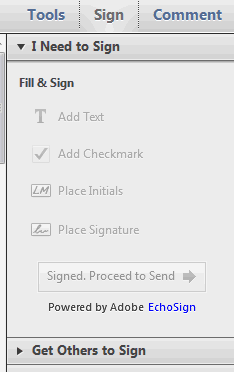
But at least you can "draw" like I mentioned in the beginning.
Finally I downloaded version XI PRO as recommended by the Adobe Help/forums. Took hours to download via the Creative Cloud. Was able to use the SIGN tool this time and was able to provide a valid secure signature (as instructed in that "How To" video).
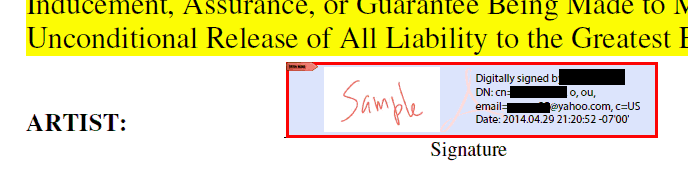
But it was a real hassle.
If anyone is having trouble with this... I think the easiest way to sign this agreement is with Adobe Acrobat Reader version 10 or higher. Even when signing is not allowed,
You can still "draw"!
(@ewu: PLEASE CONFIRM IF THIS METHOD IS ACCEPTABLE. Because it wasn't mentioned in the "How To" video Fanime linked http://tv.adobe.com/watch/acrobat-x/how-to-digitally-sign-a-document-with-adobe-reader/)
Open the pdf in Adobe Acrobat Reader and on the right side, click on COMMENT > DRAWING MARKUPS > select the pencil (DRAW FREE FORM) and draw/sign your name.
I don't know how to change the ink color though. But here's a "SAMPLE" when using a touch pad on Windows 7.
Then just fill everything out, sign, SAVE the pdf and UPLOAD it to Fanime.
---
I don't recommend the alternatives...
I initially tried printing the agreement, signing it, scanning it, and converting it into a pdf file. I got the file size down to 876 kb, but it still wouldn't upload.
I also tried using Adobe Acrobat Reader 9, but I couldn't get past the security "Signing: Not Allowed." It didn't occur to me to check/try the DRAW FREE FORM pencil before installing version 10.
With version 10, I still got the "Signing: Not Allowed" and the SIGN tool was even grayed out like this:
But at least you can "draw" like I mentioned in the beginning.
Finally I downloaded version XI PRO as recommended by the Adobe Help/forums. Took hours to download via the Creative Cloud. Was able to use the SIGN tool this time and was able to provide a valid secure signature (as instructed in that "How To" video).
But it was a real hassle.